Sequence Diagram Editor
The sequence diagram editor allows you to insert and edit diagrams based on seqdiag. Seqdiag uses a basic script language to define diagrams. This plugin adds a dialog where one can define a diagram in this script. The dialog shows a preview of the rendered diagram and when the diagram is finished it can be inserted in a zim page as an image. You can always edit it later again by selecting "Edit Diagram" from the context menu (right-mouse-click on the diagram will show the context menu).
Dependencies: This plugin requires "seqdiag" to be installed and available in the system path.
To install the "seqdiag" tool, use easy_install or pip:
Example
For example a diagram like:
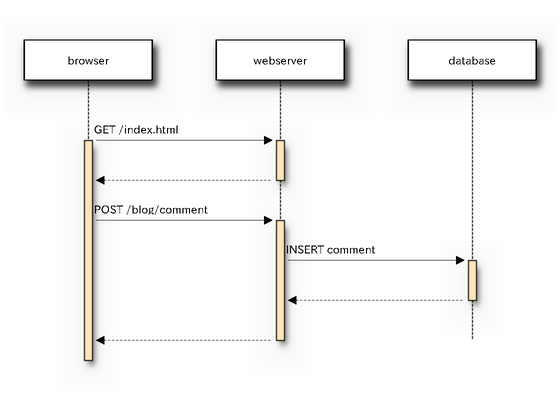
Can be created by entering the following definition in the dialog:
diagram {
  browser  -> webserver [label = "GET /index.html"];
  browser <-- webserver;
  browser  -> webserver [label = "POST /blog/comment"];
              webserver  -> database [label = "INSERT comment"];
              webserver <-- database;
  browser <-- webserver;
}
For full documentation of the script language see: http://blockdiag.com/en/seqdiag/index.html
Backlinks: manual:Plugins